Instagram Reel Size for Real Estate + Free Photo Cropper
Your photo stays on this device.
Your crop appears here
Where do captions and buttons cover a listing reel?
These drawings are our own approximate guides, not exact app measurements. Apps change their layouts, so confirm in each preview.
| Photo size | Ratio | Window (px) | Left offset (px) | Top offset (px) |
|---|---|---|---|---|
| 4000 × 3000 | 9:16 | 1688 × 3000 | 1156 | 0 |
| 4000 × 3000 | 4:5 | 2400 × 3000 | 800 | 0 |
| 6000 × 4000 | 9:16 | 2250 × 4000 | 1875 | 0 |
| 6000 × 4000 | 4:5 | 3200 × 4000 | 1400 | 0 |
| 3024 × 4032 | 9:16 | 2268 × 4032 | 378 | 0 |
| 3024 × 4032 | 4:5 | 3024 × 3780 | 0 | 126 |
| 1920 × 1080 | 9:16 | 608 × 1080 | 656 | 0 |
| 1920 × 1080 | 4:5 | 864 × 1080 | 528 | 0 |
- Top strip: the app header covers part of the frame.
- Bottom strip: captions and the account name sit here.
- Right strip: like, comment, and share buttons sit here.
What real estate reel size should agents use on Instagram, TikTok, and Shorts?
Use 1080 × 1920 pixels (9:16) for full-screen reels and 1080 × 1350 pixels (4:5) for a portrait feed photo. Length limits are set by each app, so check the current limit on its help page before you plan an edit.
- Full-screen reel (Instagram Reels, TikTok, YouTube Shorts)
- 1080 × 1920 · 9:16
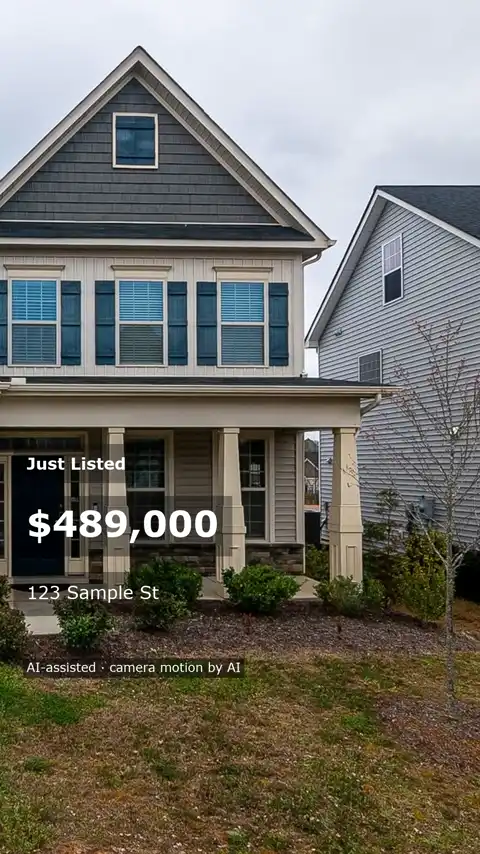
- Keep the address and main room features near the center. Leave room below for captions and to the right for buttons.
- Portrait feed photo on Instagram
- 1080 × 1350 · 4:5
- Keep the key feature centered so it survives thumbnail previews.
- MLS or listing site
- Set by the board · Set by the board
- Follow the board and site rules for file or link, ratio, length, and branding.
What should you check before posting a listing reel?
- Put the address and open house time in the middle third of the frame.
- Keep text clear of the bottom edge, where captions sit, and the right edge, where buttons sit.
- Preview the vertical edit inside each app before you post.
- Pick a source photo with room around the feature buyers should see.
- Check the MLS board rules before reusing the same file there.
What we measured
Computed on n = 4 common listing photo sizes (computed 19 November 2026). We ran four common listing photo sizes through the same crop rule the cropper above uses. The crop is centered and keeps the largest area that fits the ratio. Each percentage is the kept width or height divided by the original, rounded to one decimal. You can repeat it with any photo size.
| Photo size | 9:16 keeps | 9:16 export | 4:5 keeps | 4:5 export |
|---|---|---|---|---|
| 4000 × 3000 | 42.2% wide, 100.0% tall | 1080 × 1920 | 60.0% wide, 100.0% tall | 1080 × 1350 |
| 6000 × 4000 | 37.5% wide, 100.0% tall | 1080 × 1920 | 53.3% wide, 100.0% tall | 1080 × 1350 |
| 3024 × 4032 | 75.0% wide, 100.0% tall | 1080 × 1920 | 100.0% wide, 93.8% tall | 1080 × 1350 |
| 1920 × 1080 | 31.6% wide, 100.0% tall | 603 × 1072 | 45.0% wide, 100.0% tall | 864 × 1080 |
A wide photo loses most of its width in a 9:16 crop. A vertical phone photo keeps far more.
How do you crop a wide listing photo for social media?
- Choose a listing photo in the cropper above.
- Pick 9:16 for a full-screen reel or 4:5 for a portrait feed photo.
- Check the preview. If a feature is cut off, choose a photo with more room around it.
- Download the PNG and add it to your edit.
Next, see how to sequence listing photos into a video, explore the real estate reels maker, or compare the real estate video maker for full listing videos.
What size video should you send to the MLS?
Follow your MLS board and listing site rules. Ask which sizes, aspect ratios, and lengths they accept, whether to submit a file or a link, and whether branding is allowed.
How we checked these sizes
We checked the sizes on this page on November 19, 2026 against the official help pages for Instagram reel sizes and aspect ratios and uploading YouTube Shorts. App rules change, so check them again before a big campaign.
How we wrote this: by the Tourly team, on 19 November 2026. Basis: the sizes come from the official help pages above; the crop percentages are computed with the same crop rule as the cropper.
Questions about real estate reel sizes
What is the best Instagram Reel size for a property listing?
Use 1080 × 1920 pixels at a 9:16 aspect ratio for a full-screen vertical property reel. Check the cover separately in your profile and feed previews.
What size should I use for a portrait feed photo?
Use 1080 × 1350 pixels at a 4:5 aspect ratio. The shorter frame leaves more room at the sides of a landscape photo than a 9:16 crop.
Can one vertical edit work for Reels, TikTok, and Shorts?
Yes. Start with one 1080 × 1920 edit and preview it in each app. Check that captions and buttons leave the address and main room features visible.
Where should I put the address and price in my reel?
Place them near the center, with space below for captions and to the right for buttons. Safe zones are approximate, so preview the reel before posting.
Why did my crop download at less than 1080 pixels wide?
The cropper keeps the selected aspect ratio and uses a smaller output when the source crop has fewer pixels. Choose a larger photo to reach the full dimensions.
Does the cropper upload my listing photo?
The cropper reads the photo on your device and saves the result as a PNG. The photo stays in your browser throughout the crop and download.
Can I use the same reel on my MLS?
Check your MLS board rules and the listing site before posting. Ask whether they accept a video file or link and whether they restrict branding, aspect ratio, or duration.
Made by Tourly, a small team building listing video tools. Questions or a clip that looks wrong? Contact us.