Home Tour Video Maker for Listing Photos
Upload the listing photos you already have. They are put in the order a buyer would walk through the home, each one gets a slow camera move, and the tour comes back in landscape and vertical.
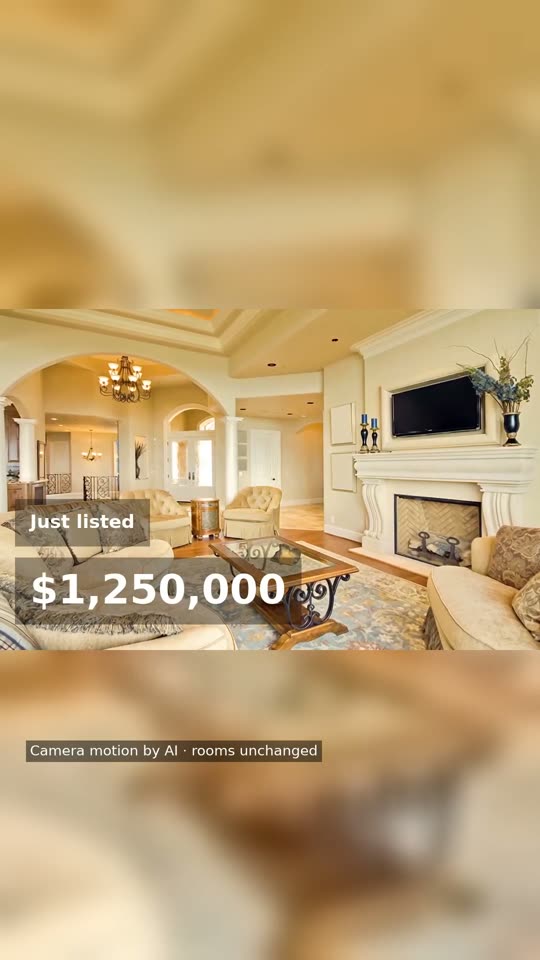
A full tour from 5 listing photos, vertical version.
Home tour video samples, landscape
Two finished tours made from ordinary listing photos, unedited. Press play; each has music, so turn the sound on.
The room order a home tour video follows
A home tour video works when it feels like walking through the front door, not like flicking through a gallery. Each photo is labelled by room when you upload it, and the tour is put together in this order:
- Front of the home. The first impression, the same one a buyer gets pulling up.
- Living room. Where a buyer would walk in, so the tour feels like a visit.
- Dining room. Next to the living area, as it usually is on foot.
- Kitchen. Right after the living areas, as you would reach it on foot.
- Bedrooms. In the order you uploaded them, so put the main bedroom first.
- Bathrooms. After the bedrooms they serve.
- Other rooms. Laundry, study, garage and anything else come after the bathrooms.
- Backyard, pool, view. Last, to finish on something memorable.
Photos of the same room keep the order you give them on the upload screen. So if a home has three bedrooms, put the main one first.
How long a home tour video runs on each platform
Every photo stays on screen for about 3.5 seconds in the Editorial look and 2.7 in Social, so 25 photos make a tour of about 90 or 70 seconds. One render gives you both files below.
| Where it goes | File | What to post | Tip |
|---|---|---|---|
| Your listing page and portals | 16:9 landscape | The full tour, every photo | Someone on the listing page has already clicked on this home, so show all of it. |
| YouTube | 16:9 landscape | The full tour | Put the address and suburb in the video title. |
| Instagram Reels and TikTok | 9:16 vertical | The full tour, or a 15-second reel of the best rooms | Both take videos longer than a 25-photo tour. Use the reel when you want only the best rooms. |
| Facebook and email | Either | The full tour | Landscape plays wider in a feed on desktop, vertical on phones. |
For a short teaser of the best three or four rooms, the real estate reels maker makes a 15-second vertical cut for $4.90.
Which listing photos make a good tour
- One good photo per room beats three similar angles. The tour shows every photo you upload.
- Landscape photos work best. In the 9:16 version a landscape photo sits in the middle of the frame over a soft, blurred copy of itself.
- Include the front of the home. It becomes the opening shot.
- Bright, level photos give the camera move the most to work with. Kitchens and bathrooms get a gentle 3D move made from the photo itself, because busy surfaces are where AI motion most often goes wrong.
- Leave out floor plans and text graphics. They are not rooms and do not move well.
The camera move is checked against your photo before it goes in the tour. A move that bends a door frame or adds a window is thrown out, as explained on how we check accuracy.
A photo tour or a filmed walk-through?
A videographer films the home and edits it into a tour. A photo tour animates the pictures you already paid for. Neither is better in general; they suit different listings.
Photos are enough when
- You already have the listing photos and want a video today
- The budget does not stretch to a videographer for this listing
- You want the same look on every listing without booking anyone
Book a videographer when you want
- Drone shots, a pool you want to see rippling, or a view that only works in motion
- A walk through doorways from room to room, filmed in one take
- You on camera, talking about the home in your own words
Home tour video FAQ
How do I make a home tour video from photos?
Upload 5 to 25 listing photos, type the price, address and your contact details once, and pick a look and music. The rooms are recognised and put in walk-through order, each photo gets a slow camera move, and you get the video in 16:9 and 9:16. Try a free 15-second sample first; the full video is $19.
How long is a home tour video made from 25 photos?
About 90 seconds in the calm Editorial look, which starts a new shot about every 3.5 seconds, or about 70 seconds in the faster Social look, about every 2.7 seconds. Five photos make about 18 seconds in Editorial and 14 in Social. A mascot intro adds about 8 seconds.
Can I put the home tour video on YouTube and Instagram?
Yes. Every full video comes in two files: 16:9 for YouTube, your listing page and portals, and 9:16 for Instagram Reels, TikTok and YouTube Shorts. They are yours to post wherever you like.
Does it change how the rooms look?
It should not, and every clip is checked. Frames from each clip are compared with your photo; a clip that adds or removes anything is made again once with a gentler move, and if it fails again that photo gets a pan-and-zoom of the real picture. We never stage rooms, add furniture or change the sky.
Can I use drone shots or phone video in the tour?
Not yet. The tour is built from still photos only. If a listing has drone footage or a filmed walk-through, a videographer or editor is the better fit for that one.
Do I need an account to make a home tour video?
Not for the free sample: one 15-second sample per device, 1080p with a PREVIEW watermark, in about 4 minutes. You pay only after you have watched it. A paid full video usually takes 4 to 10 minutes.
Made by Tourly, a small team building listing video tools. Questions or a clip that looks wrong? Contact us.