Real Estate Video Templates for Listing Photos
Choose a look, a status card and music. The template does the rest: camera motion on each photo, cuts on the beat, your price and contact details in place. Nothing to drag into slots.
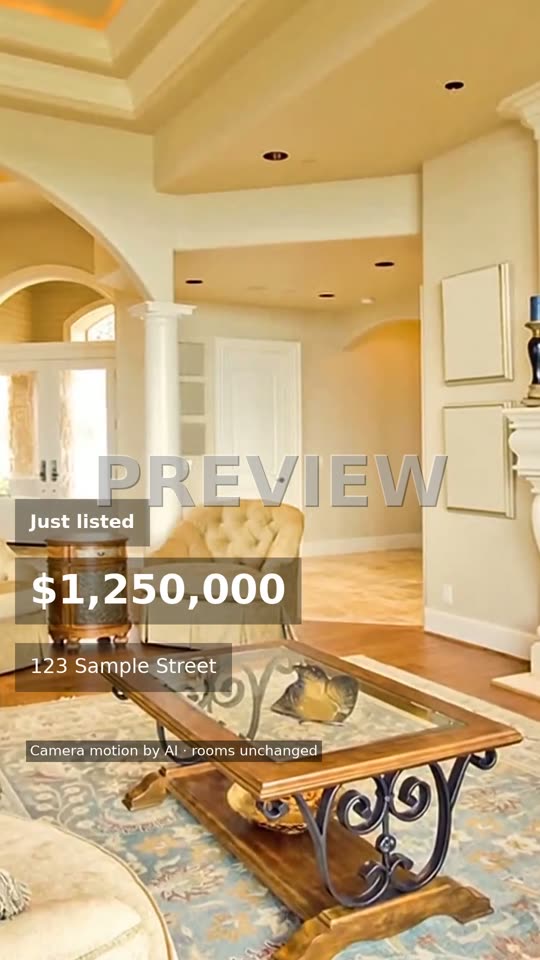
Editorial, Just listed, warm acoustic: the free sample, with its PREVIEW watermark.
Template samples with their settings
Real output from the templates, unedited, with the exact choices behind each one. One set of choices gives you both formats.
- Look: Editorial
- Card: Just listed
- Music: warm acoustic
- Format: 16:9
- Look: Editorial
- Card: Just listed
- Music: warm acoustic
- Format: 9:16
- Host: Max, AI mascot
- Labelled as an AI character
- Paid videos only
What a real estate video template decides for you
A template is a saved set of choices. Here it covers eight things, and you only touch the ones you want to change:
- Look
- Pace, transitions and text size. Editorial or Social.
- Status card
- The words on the opening shot, from Just listed to Sold.
- Music
- Warm acoustic, upbeat pop or calm piano. Cuts land on the beat.
- Brand colour
- The price and the room labels are drawn in it.
- Captions
- Price, address, beds and baths, and one highlight you type.
- Agent card
- Your name, contact and brokerage logo on the end card.
- Format
- 16:9 and 9:16 together, or only the one you need.
- Host
- Optional: an AI mascot or your own avatar opens the video.
Editorial or Social: two looks compared
The look is the biggest choice, because it sets the pace. These are the target values each look starts from.
| Look | New shot every | Transition | Text | Default music | Best for | Not ideal for |
|---|---|---|---|---|---|---|
| Editorial | About 3.5 s | Soft fade, 0.5 s | Small, elegant | Warm acoustic | Family homes, luxury listings, your listing page | A feed where people scroll fast |
| Social | About 2.7 s | Slide, 0.3 s | Bold, large | Upbeat pop | Reels and TikTok, rentals, first-home buyers | Quiet, high-end homes that need room to breathe |
With music on, the shot length is nudged to a whole number of beats, so every cut lands on the beat.
Status cards from Just listed to Sold
One listing can carry five posts over its life. Make the tour once, then post it again with a new card at each stage.
- Just listed: The first week on market. The default card.
- Open house: A few days before the inspection; put the time in the highlight.
- Price reduced: Repost the same tour with the new price.
- Under contract: Tells followers the home has a buyer.
- Sold: A result post for your profile, showing homes you have sold.
Templates you fill in vs templates that fill themselves
Many real estate video templates are layouts in a design app: you place the photos, type over the placeholder text and export. That gives you full control, and the work is yours on every listing.
Here the template has no slots. You give it photos and details, and each photo gets its own camera move, checked against the original so no room is changed (see how every clip is checked). For a single short clip, the real estate reels maker uses the same templates at 15 seconds; for every room of a home, the home tour video maker takes up to 25 photos.
Pick a design-app template when
- You want full control over every frame and font
- You enjoy editing and have the time per listing
- The video is mostly text, like a market update
Pick these templates when
- You want the same look on every listing in minutes
- You want a camera move on every photo, checked against it
- You need landscape and vertical from one go
Real estate video templates FAQ
Are there free real estate video templates?
Every template here can be tried free: pick a look, a status card and music, add 3 or more photos, and you get a 15-second sample with a PREVIEW watermark, no account needed. The HD reel is $4.90 and the full video in both formats is $19.
Do I have to edit the template myself?
No. There is no timeline. You type the price, address, beds and baths, one highlight and your contact details once, and the template places them. Camera motion, cuts on the beat and the end card are done for you.
What is the difference between the Editorial and Social look?
Editorial is calm: a new shot about every 3.5 seconds, half-second soft fades and small text, with warm acoustic music by default. Social is quicker: a new shot about every 2.7 seconds, short slide transitions and bold text, with upbeat music by default.
Can I use my brand colour and logo?
Yes. Set your brand colour once and the price and the room labels are drawn in it. Add your brokerage logo and it sits small in a corner through the video, then larger on the end card. Your details are saved in the browser for the next listing.
Which status cards are there?
Just listed, Open house, Price reduced, Under contract and Sold. The card sits on the opening shot, so the same photos can be reused for each stage of the listing.
Are these the same as Canva real estate video templates?
They are a different kind of tool. A design-app template is a layout you edit yourself. Here you never open an editor: the template sets the look, and each photo gets its own camera move, checked against the original so the room is not changed.
Made by Tourly, a small team building listing video tools. Questions or a clip that looks wrong? Contact us.